
What is Claude Code Subscription and How Does It Work?
There’s this moment every developer hits… usually late at night. Not completely lost – you know what you’re trying to do – but something just isn’t clicking. Maybe it’s a weird bug, maybe a logic issue, maybe just one of those “why is this not working?” situations that slowly drain your patience. You Google. You scroll. You open Stack Overflow tabs like a maniac. Half the answers don’t fit your use case. The other half… feel outdated. And then you think – “Maybe I need a better tool.” That’s usually where tools like Claude Code Subscription come into the picture. Not as magic. Not as a replacement for your skills. But as… support. Like a second brain that doesn’t get tired.
But here’s the real question – Is it actually worth paying for?
Because let’s be honest – developers don’t mind spending money. But only when it genuinely saves time or improves workflow. You don’t want another shiny tool that you’ll use for 3 days and forget. I’ve seen people get super excited about AI coding tools… and then slowly stop using them. Not because they’re bad – but because they didn’t fit into their real workflow. So this article isn’t going to hype things up blindly. We’re going to break it down like a real developer would:
• What it actually does
• Where it helps (and where it doesn’t)
• Whether it’s worth your money in 2026
Think of this less like a review… and more like a conversation you’d have with a developer friend who’s already tried it.
What is Claude Code Subscription and How Does It Work?
At its core, Claude Code Subscription is an AI-powered coding assistant – but calling it just that feels a bit… incomplete. Because it’s not just about writing code.
It helps you:
• Understand code (even messy or unfamiliar codebases)
• Debug faster
• Generate logic or structure when you’re stuck
• Explain concepts in simple terms
Think of it like this – instead of switching between Google, documentation, forums, and trial-and-error. You have one place where you can ask directly. Let’s say you’re working on an API integration. Something breaks. Instead of spending 30 minutes searching, you paste your issue into Claude and get a direction instantly. Not always perfect. But usually useful enough to move forward. A friend of mine used it while building a small SaaS tool. He said something interesting – “It didn’t write my code. But it saved me from getting stuck.” That’s the real value. It doesn’t replace thinking. It reduces friction. And in development, friction is what slows you down the most.
Key Features of Claude Code Subscription Every Developer Should Know
Here’s where things get more practical. What does it actually do that matters?
1) Context Understanding – Unlike basic tools that just respond line-by-line, Claude handles larger chunks of code better. You can paste a full function, even a file sometimes, and it doesn’t completely lose track.
2) Explanation Quality – Sometimes you don’t need code. You need clarity. And honestly, this is where it shines. It explains things in a way that doesn’t feel robotic. I once used it to understand a piece of legacy code (you know the scary kind). It didn’t just explain what the code was doing – it explained why it might have been written that way.
3) Iteration. – You can refine your question, go deeper, tweak outputs almost like having a conversation. That back-and-forth is where most of the real value comes from. But yeah it’s not flawless. Sometimes it over-explains. Sometimes it gives slightly off solutions. So you still need judgment.
Free vs Paid Claude Code Plans: What’s the Real Difference?
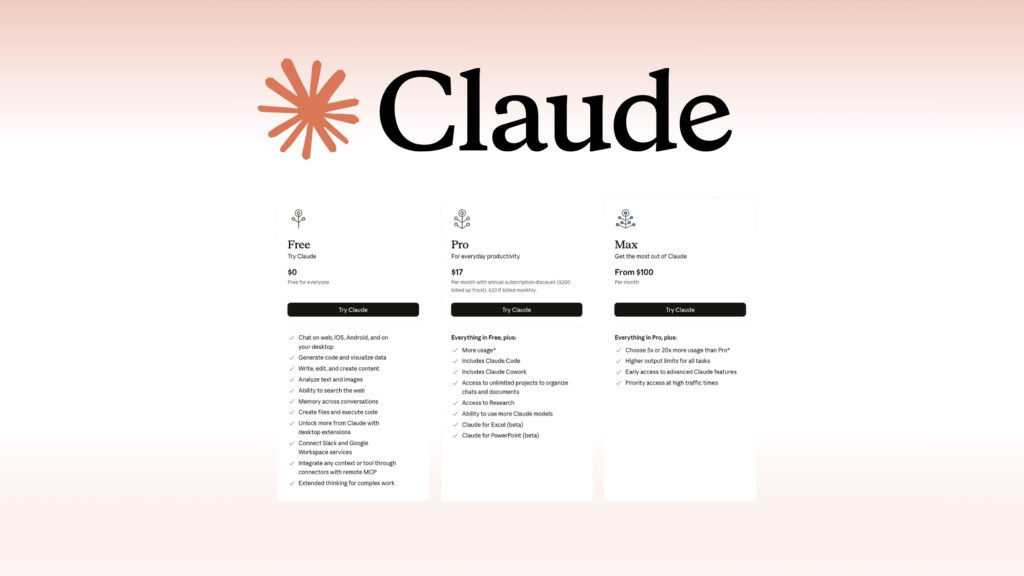
This is where most people get stuck. “Free version kaafi hai kya?” Short answer – depends on how you use it. The free version is good for: Light usage, Quick queries & Occasional debugging. But once you start relying on it regularly, limits become noticeable.
The Claude Code Subscription (paid) usually gives: Higher usage limits, Better performance consistency & Access to more advanced capabilities. Think of it like this – free is for experimenting. Paid is for integrating into your daily workflow. If you’re coding occasionally, free is fine. But if you’re building projects, working professionally, or just hate getting interrupted by limits paid starts making sense. It’s less about features more about freedom to use it properly.
Pricing Breakdown: Is Claude Code Subscription Worth the Cost?
Let’s talk about money – because that’s what this decision really comes down to. Most developers don’t mind paying ₹1,000 – ₹3,000/month if it saves time. So ask yourself:
• Does it save you 1–2 hours per week?
• Does it reduce frustration?
• Does it help you learn faster?
If yes – it’s already paying for itself. But if you’re barely using it then even ₹500 feels wasted. Personally, I see it as buying a better chair for work. You can survive without it. But once you get used to it, going back feels uncomfortable.
Pros and Cons of Claude Code Subscription for Developers
Pros:
• Speeds up debugging
• Helps understand complex code
• Reduces context switching
• Great for learning
Cons:
• Not always 100% accurate
• Can make you slightly dependent if you’re not careful
• Subscription cost adds up over time
It’s a tool. Not a solution. How you use it matters more than what it offers.
Should You Buy Claude Code Subscription or Skip It?
If you’re a:
• Beginner → Try free first
• Intermediate → Consider paid
• Professional dev → Probably worth it
But don’t buy it because of hype. Buy it because you feel the need for it.
What Developers Are Actually Saying
1) Rohit Jain, Full Stack Developer – Honestly, I didn’t expect much. But it helped me debug faster. Not perfect, but useful enough to keep using.
2) Ananya Gupta, Frontend Developer – Free version was fine initially, but limits got annoying. Switched to paid – smoother experience now.
3) Karan Malhotra, Indie Hacker – I use it daily, but I still double-check everything. It’s more like a helper than a solution.
Frequently Asked Questions – Claude Code Subscription
1) Is Claude Code Subscription better than free tools?
Depends on usage. For regular work, yes – mainly because of fewer limits.
2) Can beginners use it?
Yes, but don’t rely on it too much. Use it to learn, not just copy.
3) Is it accurate?
Mostly helpful, but not always perfect. Always verify.
4) Does it replace developers?
No. It speeds up work, but thinking is still yours.
5) Is it worth paying monthly?
If you use it consistently – yes. Otherwise, stick to free.
Conclusion
At the end of the day. Claude Code Subscription isn’t about code. It’s about how you work. If you’re someone who likes figuring things out slowly, step by step – you might not need it. But if you value speed, clarity, and reducing frustration… it can quietly become one of your most-used tools. Not flashy. Not life-changing overnight. But useful. Consistently. And sometimes that’s exactly what you need.